3DEXPERIENCE Works Simulation can help SOLIDWORKS designers validate designs and make informed decisions throughout the product development process, even in the earliest design stages.
SOLIDWORKS
SOLIDWORKS and CST Studio enables wireless solutions provider to reduce the number of design revisions, speed development, and enhance company-wide collaboration and communication.
Design a new antenna that improves performance and is functional across harsh conditions and environments.
Implement modeling, design, data management, simulation, collaboration, and communication solutions from the 3DEXPERIENCE Works portfolio, which operates on the cloud-based 3DEXPERIENCE platform.
Wireless communication technology has become so deeply integrated into day-to-day life that most people take it for granted. From mobile phone conversations to seamless internet connectivity, the technology underpinning these capabilities is complex and relies on a vast array of components, standards, and protocols. Not surprisingly, the demand for reliable and efficient solutions is ever-growing.
Inovonics, a provider of wireless solutions, has a straightforward motto: It just works. This principle is not just a tagline but a commitment to engineering excellence that applies to every product they develop. “Nothing in our world can communicate without antennas,” says Inovonics Staff Hardware Design & Regulatory Engineer Mark Zakhem

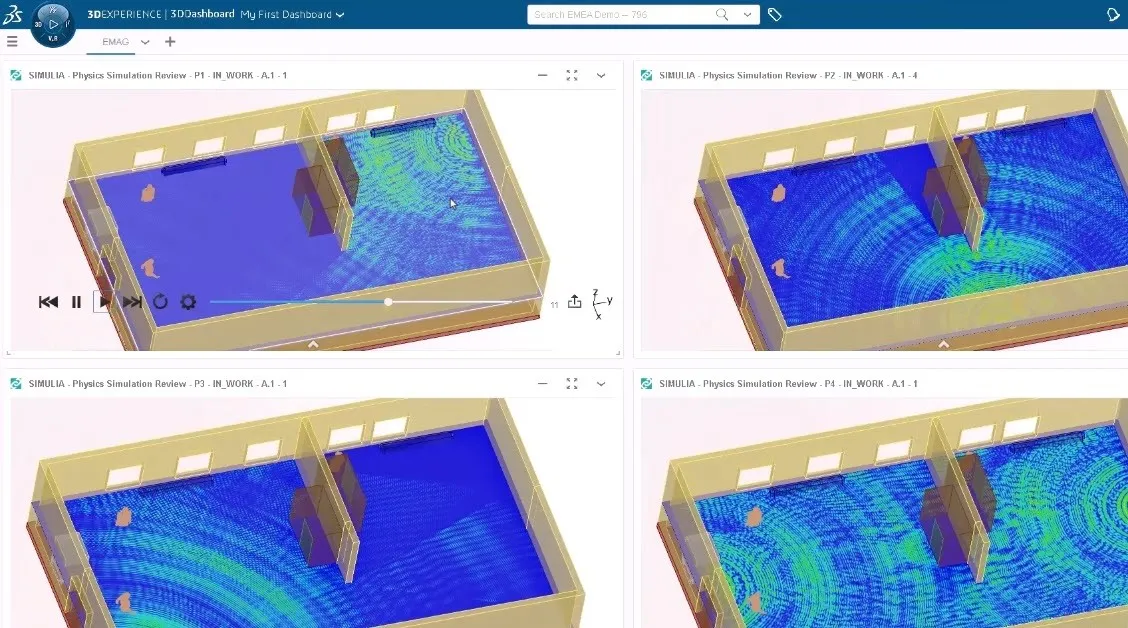
Placing antennas involves navigating myriad challenges. Zakhem points out that various environmental factors can detune an antenna, such as interference from physical obstacles like metal cabinets or human movement. (Note: a detune is a shift from the ideal frequency, leading to poorer signal performance and efficiency.)
An environment’s influence on performance is significant, especially with higher frequencies that demand precise location accuracy. “Displacement is the second most important thing, not only within a device, but where a device is located in its environment is really important,” Zakhem emphasizes. Avoiding obstacles is crucial when placing an antenna: How high or low on a wall? Can it go on a ceiling? Will it be interrupted by human activity? Installers must also consider safety considerations around human proximity, which tie directly to regulatory compliance.
“If your antenna is placed in an environment where it could be interrupted ... all those different materials and those different environments will have an effect on the antenna,” Zakhem explains. To combat these issues, Inovonics meticulously designs its devices to ensure functionality across diverse conditions and environments. He continues, “We have to design accordingly and account for these detuning scenarios to make sure that in all these scenarios, this [specific]antenna works the way we want it to.”
3DEXPERIENCE Works Simulation can help SOLIDWORKS designers validate designs and make informed decisions throughout the product development process, even in the earliest design stages.
SOLIDWORKS
I can pull up my designs on a tablet and take it to a meeting. From my phone I can run a quick simulation that’s already set up. If I want to run a simulation, I don't need the actual hardware to run it…I love the 3DEXPERIENCE platform because it allows me to do my job with my co-workers in such a fast and clean way where not only do I get my job done quicker, but I get it done better.
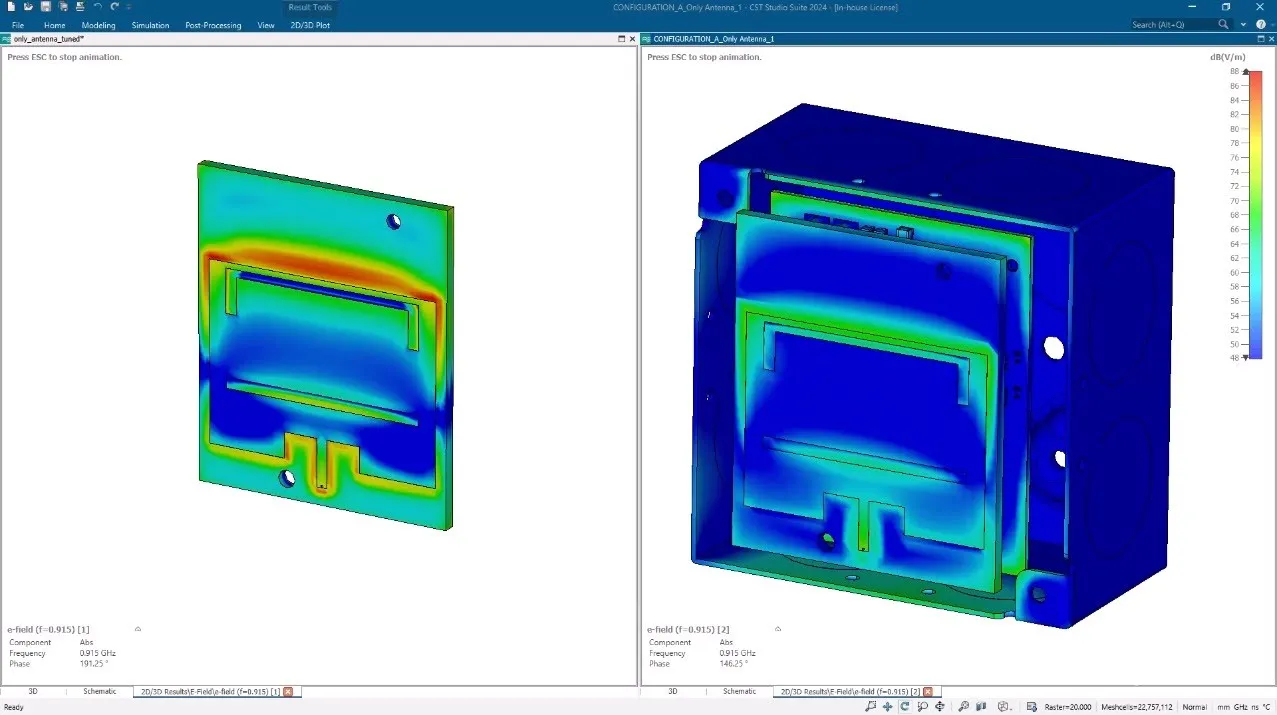
Inovonics mechanical engineering team already used SOLIDWORKS 3D CAD software to design its hardware products with pinpoint accuracy. To streamline their design process and enhance product reliability, Zakhem introduced the Inovonics team to Dassault Systèmes CST Studio software. CST Studio helps companies digitally test electromagnetic components like antennas by analyzing electromagnetic fields, which enables companies to eliminate a large portion of downstream physical testing in the lab.
Zakhem recommended CST Studio as a tool when he started at Inovonics. He liked the interface and found it easy to start learning it while discovering its advanced features, enabling the development team to achieve impressive results. Zakhem notes, “CST has the ability to model so many different environments and scenarios within and outside the enclosure of our products. I’m able to basically anticipate most [design issues] before we get it into the lab, which cuts down on revision times. [Using CST Studio] with a lot of our products, we’ve seen our first proof of concept antenna working exactly as designed, which is pretty incredible.”
This approach not only optimizes the design phase but also significantly reduces revision cycles, enhancing the speed and efficiency of product development.

In addition to CST Studio, Zakhem leverages the integration with the 3DEXPERIENCE platform, which facilitates seamless file management and storage, along with quick and easy collaboration with team members. The 3DEXPERIENCE platform enables Zakhem and his team to access and run simulations remotely, which fosters a flexible and dynamic work environment. “I can pull up my designs on a tablet and take it to a meeting. From my phone I can run a quick simulation that’s already set up. If I want to run a simulation, I don't need the actual hardware to run it,” he enthuses.
Looking forward, Zakhem is optimistic about the ongoing innovation at Inovonics. “I love the 3DEXPERIENCE platform because it allows me to do my job with my co-workers in such a fast and clean way where not only do I get my job done quicker, but I get it done better.”
What You Need to Know about 3DEXPERIENCE Works Simulation
Brochures
Great ideas can come from many places. Product developers must find ways to bring their best people together so they can effectively collaborate as an ongoing part of development process, but must do this without incurring the cost of bringing everyone to a single location, installing more software, or purchasing additional hardware.To make collaboration more effective in generating innovation, product developers must be able to connect and collaborate without negatively impacting development cycles. They simply need to work smarter, not harder, and collaborate more, not less.This eBook shows how two companies used tools on the Extended SOLIDWORKS Portfolio to:Boost productivity and foster innovation with cloud-based toolsTake advantage of built-in data management capabilities with zero IT overheadConnect and gather feedback in a way that doesn’t delay development cyclesSafely collaborate on designs in real time with colleagues, partners, and suppliersLeverage SOLIDWORKS design tools to connect design teams any time, from anywhere and on any deviceDownload the eBook to discover the benefits of adopting a cloud-based approach to product design.
EBooks
Nearly half (44%) of manufacturers say design decisions have become more difficult. If engineering wasn’t hard enough, economic fallout from COVID-19 will likely result in more responsibility falling on engineers who have fewer resources at their disposal. Business must go on; and for engineers to complete their work effectively, they need to be empowered with powerful tools to solve problems faster. As this report details, simulation, particularly cloud-enabled analysis, is a must-have tool. Here’s what cloud simulation users are reporting: 71% more computing power/faster solver 50% frees up engineers’ computers 42% easier access to experts 42% easier collaboration 42% lowers hardware cost of ownership and maintenance
EBooks
SOLIDWORKS drastically reduce prototypes by 70 percent, improve product performance, and cut machine delivery times in half.
Customer Story
SOLIDWORKS solutions enable you and your team to quickly transform new ideas into great products.