Now collaborate with your team within SOLIDWORKS using TeamHub Learn more


Our Product Offers for Sponsorship

SOLIDWORKS cloud icon

SOLIDWORKS xDesign

Next-generation browser-based 3D CAD with collaboration. Best for large teams with Macbooks or Chromebooks

SOLIDWORKS desktop icon

SOLIDWORKS Desktop

Proven and Powerful SOLIDWORKS® 3D CAD. Best for small teams with Windows PCs.

SOLIDWORKS  Desktop and Cloud icon

SOLIDWORKS Desktop + Cloud Services

Proven and powerful 3D CAD with collaboration. Best for large teams with Windows PCs.

NEW: Collaborate within SOLIDWORKS using TeamHub

SOLIDWORKS TeamHub is an add-in available in all Student and Education licenses that allows students to manage and store files by connecting to their Git® repository. It enables collaboration on assemblies and includes the ability to lock & unlock files, view & revert history, and create branches & merges.

Our 3 Product Offers - Apply Today to Get a FREE License!

SOLIDWORKS xDesign

Next-generation browser-based 3D CAD with Collaboration
 

Features include:
  • Cloud 3D CAD: Browser-based
  • Cloud Data Management and Collaboration
  • Cloud Simulation: Design Guidance only
  • Access to Learning Content and Student Community
Devices Supported:
  • Chromebook, MACs, Tablets, Windows PC
  • No installation required

SOLIDWORKS Desktop

Proven and Powerful SOLIDWORKS 3D CAD
 

Features include:
  • 3D CAD
  • Local Storage
  • Simulation: Structure,Flow, Plastics
  • 2.5 & 3-Axis CAM
  • Access to Learning Content and Student Community
Devices Supported:
  • Windows PC only
  • Installation required


SOLIDWORKS Desktop + Cloud Services

Proven and powerful 3D CAD with collaboration
 

Features include:
  • All SOLIDWORKS Desktop Features
    +
  • Cloud Data Management and Collaboration
Devices Supported:
  • Windows PC only
  • Installation required

Why SOLIDWORKS?

The most used software

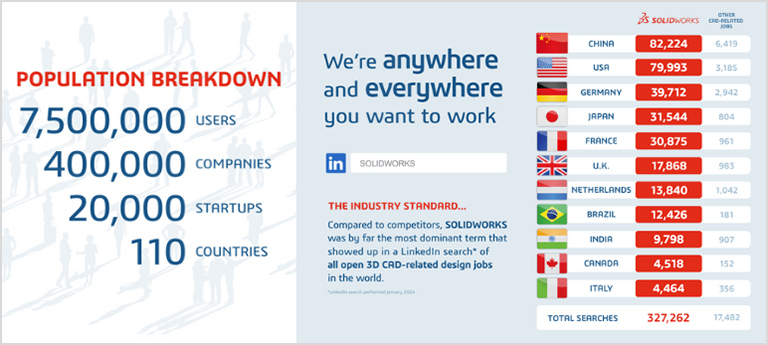
Chart showing the number of people who use SOLIDWORKS worldwide

With over 400,000 companies utilizing SOLIDWORKS and over 7.5 million users. Choose the right tools to bring your projects and career to the next level.

SOLIDWORKS equips students with essential industry skills, hands-on experience, and innovative tools, preparing them for careers in engineering and design. 

Success Stories from Mentors and Students


Joind 3DEXPERIENCE icon

Create your 3DEXPERIENCE ID to join, get empowered, and share your work to collaborate with others.