Choosing CAD tools is a lot like choosing power tools. The basics get real work done, but as your projects, team, and business grow, so do your needs. Every SOLIDWORKS Design package scales with you, so you're never stuck replacing your whole toolset just to keep up. Here's what Standard, Professional, Premium, and Ultimate each bring to your workbench.
Evaluating SOLIDWORKS Design Standard, Professional, Premium, and Ultimate
Which CAD Software Package is Right for Your Business?

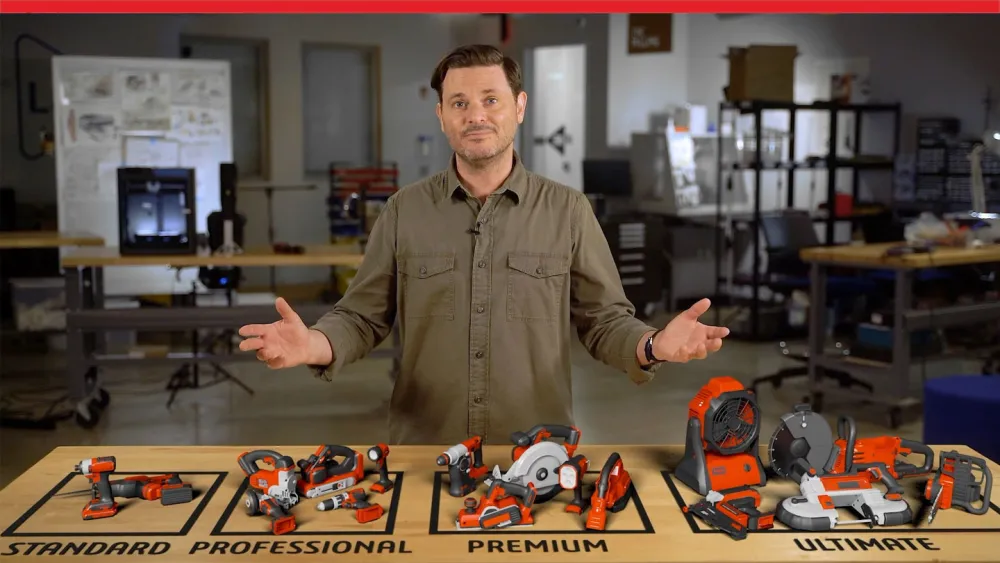
Explore SOLIDWORKS Design capabilities
Learn more
Quick SOLIDWORKS Design Package Highlights
SOLIDWORKS Design Standard
Core 3D CAD, Built Right
Model parts and assemblies, produce production-ready drawings, and run basic stress checks, with dedicated tools for sheet metal, weldments, and mold tooling built in early.
SOLIDWORKS Design Professional
Faster Data, Fewer Repeats
Pull from a searchable fastener library, estimate manufacturing costs as you design, recreate parts from scanned data, and automate repetitive drawing tasks with Task Scheduler.
SOLIDWORKS Design Premium
Validate Before You Build
Run stress and motion analysis, route pipe, tube, and wire in 3D, and flatten complex surfaces, proving designs work before they reach the shop floor.
SOLIDWORKS Design Ultimate
All-in-One, Start to Finish
Builds on Premium with cloud-based CAD and simulation, marketing, management, and documentation tools, unifying design, manufacturing, and go-to-market work for rapid iteration and higher-quality product delivery.
AI and Cloud Design Features Aren’t An Upgrade, They’re Already In The Box
SOLIDWORKS AI Virtual Companions and access to the 3DEXPERIENCE platform come with every commercial SOLIDWORKS Design license, Standard through Ultimate, at no added cost. So as you weigh tiers, don't count AI assistance or cloud data management as a reason to move up, count the design, simulation, and collaboration tools instead.
SOLIDWORKS AI Virtual Companions: AURA and LEO
Modern product engineering demands speed, precision, and smart use of resources. AURA and LEO plug directly into your design environment, reading your intent so they can automate routine steps, provide expert guidance and optimizations, and surface predictive insights that help keep projects on schedule.
Cloud Services, Out Of The Box
CAD-aware cloud storage and tools like Share and Markup let you collaborate and manage data without local PDM vaults or servers. Anyone can open and review a model straight from the browser, no viewer download required, so every package stays focused on designing rather than administering files.
How To Choose The Right SOLIDWORKS Design Package
If you find yourself between two options, work through what your day-to-day actually looks like or contact SOLIDWORKS Reseller Partner for expert guidance on your decision.
Choose SOLIDWORKS Design Standard if you...
- Need trusted, professional 3D CAD without extras
- Build parts, assemblies, and drawings mostly solo
- Work on solids, surfaces, sheet metal, weldments, or mold tooling
- Don't yet need data management or advanced analysis
Choose SOLIDWORKS Design Professional if you...
- Want a standard fastener and hardware library on hand
- Need on-premise document control as your team and file count grow
- Work from scanned data or reverse-engineer existing parts
- Want repetitive jobs like drawing creation automated
Choose SOLIDWORKS Design Premium if you...
- Need real strength and motion validation, not a guess
- Design routed systems: piping, tubing, wiring, or HVAC
- Want to flatten complex surfaces
- Need to import circuit board designs directly into your assemblies
Choose SOLIDWORKS Design Ultimate if you...
- Need product development to reach past design and simulation
- Want cloud-based project and lifecycle management tools
- Create technical documentation or marketing content in-house
- Need cloud-based, shared planning with Lean Team Player
Launch the SOLIDWORKS Online Product Trial today!
Sign up now
What Does Each SOLIDWORKS Design Package Include?
The following overview names the specific tools and capabilities included in each tier. Use this section to identify which package aligns with your team's simulation depth, data management requirements and collaboration needs.
SOLIDWORKS Design Standard
SOLIDWORKS Design Professional
SOLIDWORKS Design Premium
SOLIDWORKS Design Ultimate
Whichever Tier You Pick, You're Not On Your Own
Every SOLIDWORKS Design package is supported through a certified, local Reseller Partner that sticks around long after the purchase to help you get real value out of whichever tier you choose. SOLIDWORKS may be the industry standard, but a local, certified partner is what turns a license into a working process.

Solution Advice

Helps you match a package and add-ons to how your team actually works, and plans out when to scale up.

Local Support
Certified engineers who know your setup and can troubleshoot in your own time zone and language.

Onboarding & Training
Hands-on setup, templates, and structured courses that get your team productive from week one.

Health Checks
Periodic reviews of how you're using SOLIDWORKS, so you're not leaving capability on the table.
Frequently Asked Questions
What is included in every SOLIDWORKS Design license regardless or tier?
Are AI and cloud tools included in SOLIDWORKS Design?
What is the difference between SOLIDWORKS Design Standard and Professional?
Does SOLIDWORKS Design require an internet connection?
Can I upgrade from one SOLIDWORKS Design tier to a higher one?
How Can We Help?

Find the Flexible Solution for You
Speak with a SOLIDWORKS expert to discuss your business needs.

Find SOLIDWORKS Support
Get technical support for SOLIDWORKS products and explore ways to grow your engineering design skills.
Buy SOLIDWORKS Solutions
Flexible purchasing options give you the power to choose a license that best suits your needs.
Have Questions about SOLIDWORKS Design?
We can help you determine the best option for your team.